

Lingua AI
Lingua AI: Offline Translator
Offline translator & language tutor
Zero bars. Fully fluent.
Translate text and photos, practice conversations and build your vocabulary in 35 languages, with AI that runs entirely on your iPhone and iPad, even in airplane mode.

- 35languages
- 100%on-device AI
- A1–C2CEFR levels
- 0data collected
- Platforms
- iPhone, iPad, Android (coming soon)
- Requires
- iOS 26.4
- Languages
- English, Turkish and 33 more
- Price
- Paid app, no in-app purchases
- Version
- 3.2
Features
A closer look
-
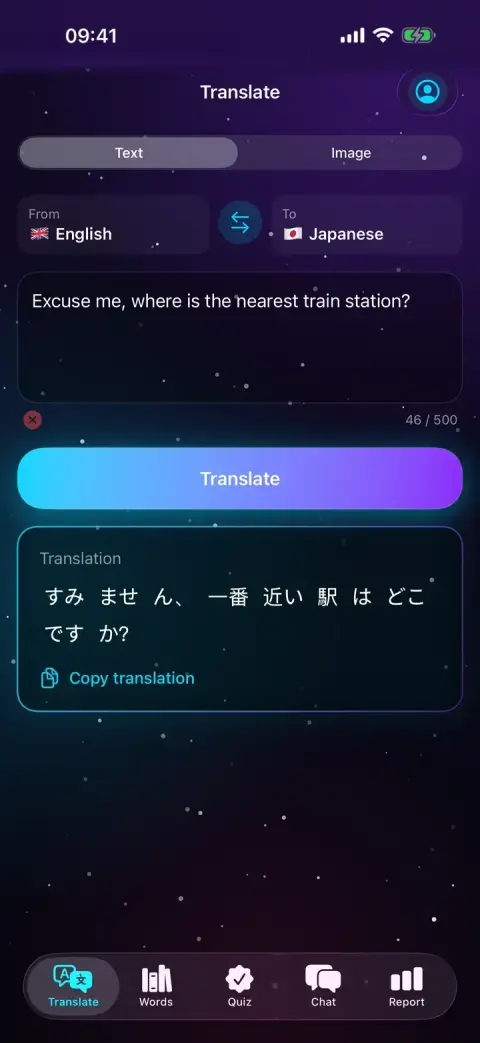
Text translation
Type up to 500 characters and translate between any two of 35 languages, with no connection needed. Copy the result with one tap.
-
Photo translation
Take a photo of a menu or sign, or pick one from your library. Apple's on-device text recognition finds the words, and Lingua AI translates them on the spot.
-
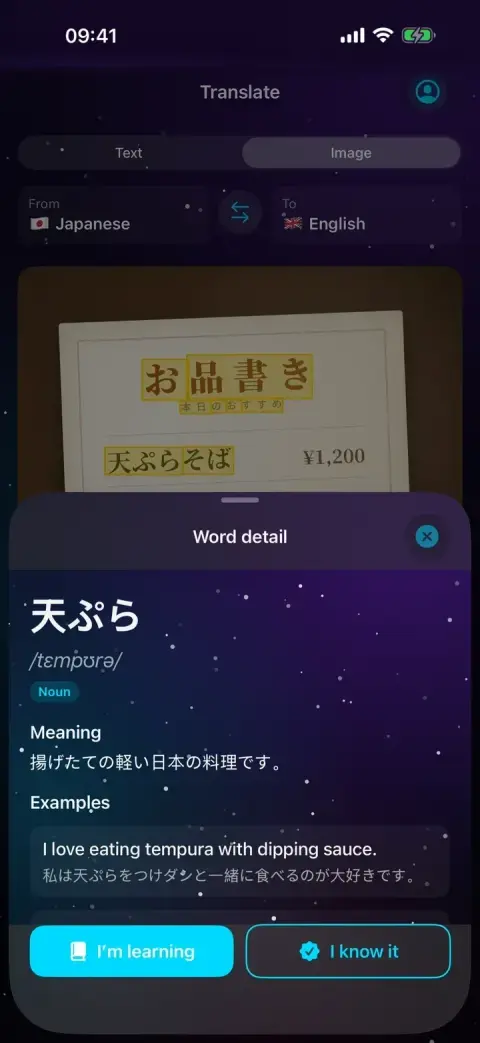
Every word, explained
Tap a word for its meaning in your language, IPA pronunciation, part of speech, example sentences with translations and a memorable note.
-
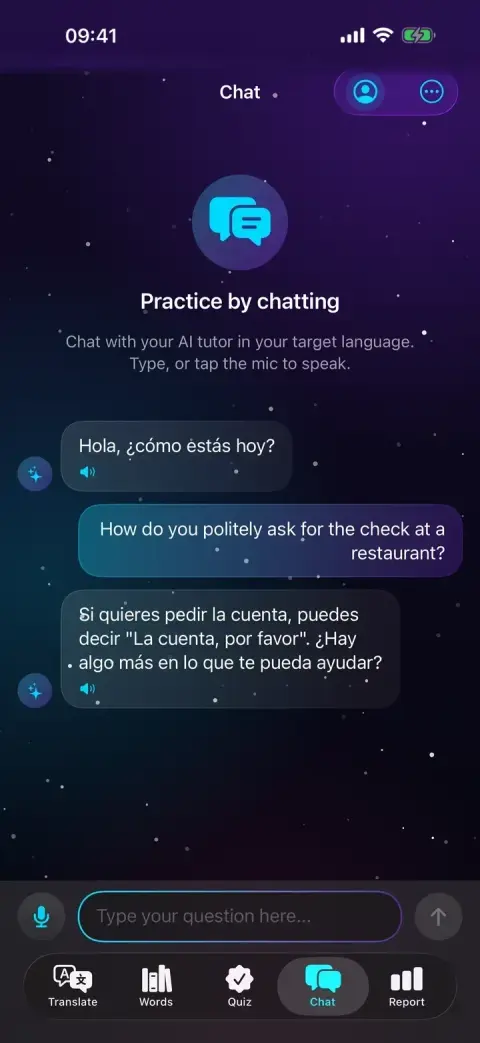
Conversation practice
Chat with an AI tutor in the language you are learning. Type or speak; replies can be read aloud, and hands-free mode keeps the conversation flowing.
-
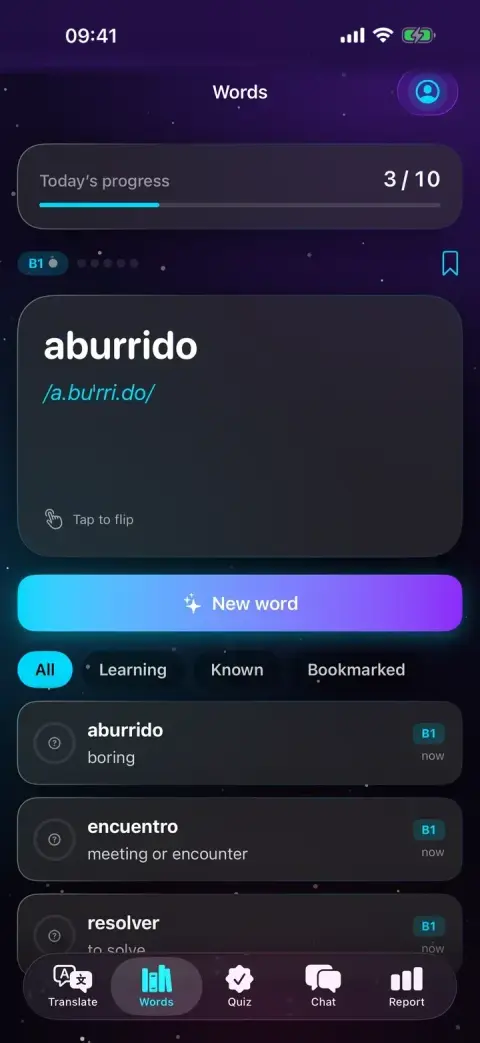
Vocabulary cards
Get new words picked for your level, flip the card and mark each one as known or still learning. Filter your collection and bookmark favorites.
-
Level test and quizzes
Find your CEFR level from A1 to C2 with five quick questions, or set it yourself. Then practice with multiple-choice, fill-in-the-blank and matching quizzes.
-
Monthly progress reports
See your accuracy trend and weekly progress, plus personal commentary on strengths, areas to improve and what to try next, generated on your device.
-
Daily reminders
Set a daily word goal and a reminder time. Reminders are scheduled locally on your device, with no server involved.
Screenshots
-
Text translation, English to JapaneseScreenshot
-

Conversation practice in SpanishScreenshot
-

Spanish vocabulary cardsScreenshot
-

Word detail from a photographed menuScreenshot
Privacy at a glance
What the app collects, as declared in the store privacy labels, explained in full in the privacy policy.
Data Not Collected
The developer does not collect any data from this app.
Questions & answers
What do I need to use Lingua AI?
An iPhone or iPad with iOS or iPadOS 26.4 or later. The AI model is built into the app, so the download is several gigabytes: keep enough free storage. Devices with more memory run the AI faster.
Does it work without an internet connection?
Yes. Translation, photo text recognition, chat practice, word explanations, quizzes and reports all run on your device, including in airplane mode. Voice input depends on which languages your device can recognize offline.
What happens to my data?
Lingua AI has no account, no ads, no analytics and no servers. What you type, photograph or say is processed on your device, and your words, history and reports are stored only there. Photos and audio are not saved.
Why is voice input unavailable for my language?
To keep your voice on your device, Lingua AI uses only Apple's on-device speech recognition and never falls back to a server. If your device cannot recognize a language offline, voice input is turned off for it and you can type instead.
Are there subscriptions or in-app purchases?
No. Lingua AI is a paid app that you buy once on the App Store. There are no subscriptions, no in-app purchases and no ads.
How do I delete my data?
Open your profile from the icon at the top right and choose Reset all data. This deletes your profile, words, translation history, quiz results, reports and cached AI answers, and cancels reminders. Deleting the app also removes everything.
Can I rely on the translations?
Lingua AI is a travel and learning aid, and AI can make mistakes. Do not rely on it for medical, legal, safety-critical or other high-stakes translations; have important content checked by a qualified person.
How do I get help?
Send us a ticket with the form on this support page. You get a private link where you can follow our reply. Mentioning your device model and iOS version helps us help you faster.
Help & legal
 Veridia